 ✕
✕
✕
✕
By Justin SabrinaUpdated on June 17, 2026
Question: "Can I download Amazon Prime Music To my laptop? I want to put Amazon Music in Virtual DJ for Mixing. So, I subscribe to Amazon Prime membership to get Amazon music downloads. But the fact is that I can only download Amazon music on my mobile devices. Is it possible to save Amazon Music files to local computer?Thanks." - from Gordan, An Amazon Prime User
Quick Answer:
1. You can utilize this professional Amazon Music downloader - UkeySoft Amazon Music Converter, to download songs, playlists, and podcasts from Amazon Prime Music, Music Unlimited, or Music Free to your computer as local MP3, FLAC, AAC, WAV files. Keep them forever!
2. Whether you have an Amazon Music subscription or not, you can purchase and download Amazon digital songs on your PC or Mac from the web player or using desktop app.
3. For users who only need to download a few Amazon Music tracks to computer, online tool - AmazonMusicConverter is still easy to try.
As an Amazon Music lover, you may want to download songs, playlists, albums, and more from your Amazon Prime Music library to your computer for offline playback or use the Amazon songs as background music in video projects, but end up finding no way to save Amazon Music on your computer offline. As both Amazon Music Prime and Amazon Music Unlimited titles are not available for download to computers. This result is caused by the rules for streaming music.
So, how to download music from Amazon Prime to a computer? Can you download Amazon Music to PC or Mac for offline listening? Keep reading. In this article, we will introduce several methods to help you effortlessly save Amazon Music songs and playlists to your computer, even without a subscription!
CONTENTS
Given the limitations of Amazon Prime Music in terms of song downloads, if you are looking for a reliable way to download music from Amazon Music to local drive on a PC, you'll need the help of professional tool like UkeySoft Amazon Music Converter.
UkeySoft Amazon Music Converter is a multifunctional tool specially customized for Amazon Prime Music and Music Unlimited users. It allows users to download songs, albums, artists, playlists from Amazon Prime Music/Music Unlimited/Music Free to local computer. With it, you can easily download Amazon Music songs to M4A/MP3/AAC/FLAC/WAV/AIFF to store them locally, or import them to other media player such as iTunes, VLC or Windows Media Player.
Featuring a built-in Amazon Music web player, it enables users to download Amazon music to computer from the web player at 16X higher speed, with batch downloads supporting. As an advanced Amazon Music Downloader, UkeySoft software will keep the original music quality and ID3 information of Amazon Music songs. This ensures you can enjoy a premium listening experience!
Main Features of UkeySoft Amazon Music Converter:
Video Guide: How to Download Amazon Prime Music to PC with UkeySoft?
UkeySoft Amazon Music Converter is highly compatible with Windows and macOS. Here we will take Windows version as example and show you a step-by-step guide to download Amazon Prime Music to PC. Please download and install UkeySoft Amazon Music Converter on your computer in advance.
Step 1. Launch UkeySoft Amazon Music Converter
After installation, launch UkeySoft Amazon Music Converter on the desktop. Click on the "Sign In", log in to the software with your Amazon account. This allows you to access the whole music library online.
Step 2. Set the Output Audio Parameter
Click the Menu icon in the upper right corner, click the Preference option to configure output audio parameters. You can set the Output Format (AUTO/MP3/AAC/FLAC/WAV/AIFF), Output Quality, Output File Name, etc.
Note: The AUTO format is M4A format. MP3 format is compatible by most music players and devices, you can select MP3 from the "Output Format" option.
Step 3. Add Amazon Music Songs/Playlists to Program
Navigate to your music library to select the desired songs, albums or playlists. Open a playlist or album, then click the "+" icon on the right to import the songs.
Once added successfully, check and confirm the Amazon songs you want to save.
Step 4. Start Downloading Amazon Prime Music to Computer
Simply press on the "Convert" button, then this tool will immediately download songs from Amazon Music Web Player to computer, and save them as MP3 files.
Step 5. Play Amazon Music on Local Computer
Now you can click "History" button or go to the Output Folder to get output songs. UkeySoft comes with a built-in music player, you can play the songs directly, or open these well-downloaded Amazon music files through Windows Media Player, VLC, iTunes, etc.
With the help of UkeySoft Amazon Music Converter, users can easily Download Amazon Prime Music to MP3 audios and save Amazon songs on computer forever. Now get its free trial and test its performance by yourself!
If you have purchased songs or albums from the Amazon Music Store, you can download them directly to your computer without using a subscription. Unlike streaming content from Amazon Prime Music or Amazon Music Unlimited, purchased Amazon Music tracks are yours to keep and can be saved as local MP3 files for offline playback and usage. After downloading, you can even transfer the Amazon songs to your MP3 player, USB drive, or enjoy them using other players like iTunes, VLC, WMP, etc.
Let's see how to download purchased Amazon Music to your computer:
Step 1. Open Amazon Music Web Player or App
Visit the Amazon Music website or open the desktop app, and sign in with the Amazon account used to purchase the music.
Step 2. Go to Your Library
Click Library from the left-hand menu to access your purchased songs, albums, and playlists.
Step 3. Select Purchased Music
Choose the Purchased tab to display all songs and albums you have bought from Amazon Music.
Step 4. Download Amazon Music Song to Computer
Find the song or album you want to save to your computer. Click the three-dot menu next to the title, click "Download" icon.
Step 5. Listen to Amazon Music Offline
Once the download is complete, you can enjoy the Amazon Music in MP3 format with other player.
If you want to download from Amazon Prime Music to computer without software, AmazonMusicConverter can be a good option. This web-based tool supports not only computers, but mobile devices. It allows you to download Amazon Prime Music to your computer by simply pasting a song or playlist URL into a browser. What's more, it offers an ad-free and simple interface, requiring no registration, no payment.
The downside is that the tool can occasionally experience parsing issues, and all downloads are limited to MP3 format with a bitrate of only 128kbps. If you don't mind, it is still a good option for basic downloads.
Step 1. Go to AmazonMusicConverter official website in a web browser on your computer.
Step 2. Open the Amazon Music app or web player, find the song you want to download, and copy its share link.
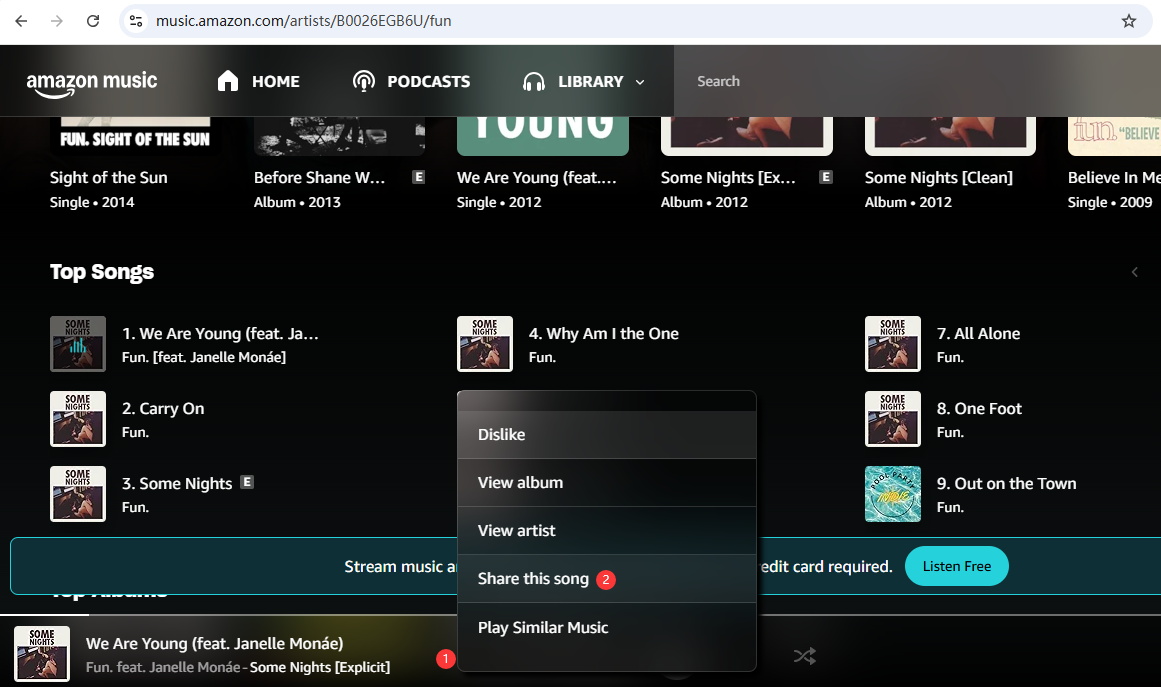
Step 3. Return to the online tool and paste the copied Amazon Music URL into the download box, click "Download" button.
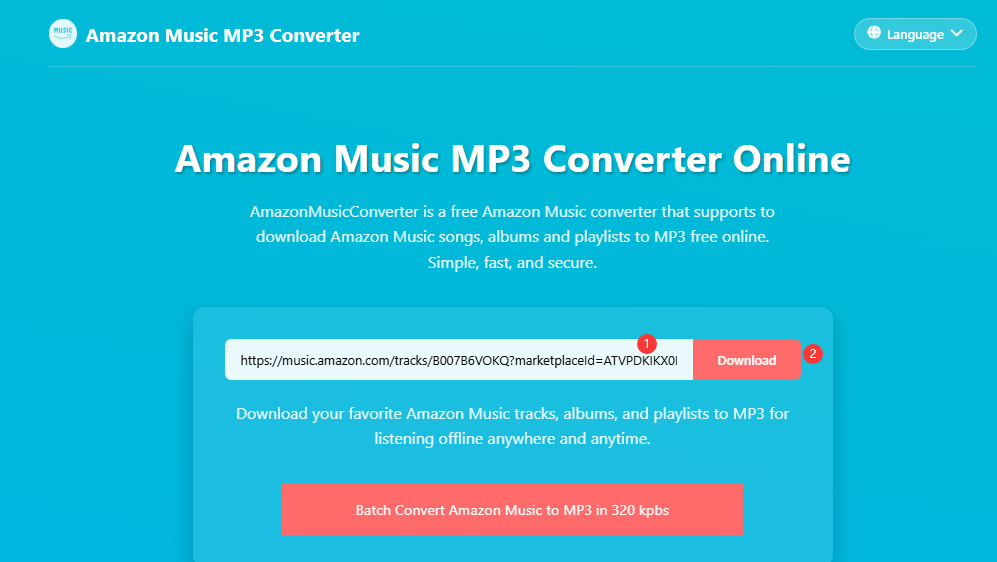
Step 4. Wait for the tool to analyze the Amazon Music link and retrieve the available tracks.
Step 5. If supported, select MP3 as the output format. Click the "Download" button to and save the Amazon Music track to your computer.
Can I download my Amazon Music to my computer?
Yes! You can download purchased music from Amazon directly to your computer as MP3 files to keep forever. However, songs downloaded via Prime or Unlimited subscriptions are for offline listening within the app only and cannot be exported.
Can you download songs from Amazon Music to a USB?
No. Amazon Music only allows paid subscribers to download music on the mobile devices. However, you can use a third-party downloader like UkeySoft Amazon Music Converter to download Amazon Music to your Mac and PC and convert them into MP3 files. These MP3 files can be copied to a USB drive, or external hard drive.
Where do Amazon Music downloads go on a Mac?
Generally, Amazon Prime Music and Amazon Music Unlimited don't let you download any music content to your Mac or PC. For your purchased Amazon song, you can download it to your Mac, it typically resides in the Music folder.
Why won't Amazon Music let me download?
If your Amazon Music app won't download songs, it is usually caused by a stuck queue, corrupted cache, outdated app version, invalid subscription, or storage limits. Luckily, you can turn to the best Amazon Music app alternative - UkeySoft Amazon Music Converter. It enables you to download Amazon Music to computer without the app, and export high-quality music downloads to your hard drive.
Downloading function of Amazon Prime Music is only valid on your mobile devices. Fortunately, the methods covered in this guide provide practical three solutions for downloading Amazon Prime Music to your computer. Among them, UkeySoft Amazon Music Converter stands out as the most comprehensive and reliable option. It enables you to download Amazon Music to MP3 and other popular formats while preserving original audio quality, ID3 tags, and playlist information. With support for batch downloads, high-speed conversion, and flexible output settings, UkeySoft makes it easy to build a permanent offline music library. Whether or not you have an Amazon Music subscription, you can use it get your Amazon Music downloads locally!

Prompt: you need to log in before you can comment.
No account yet. Please click here to register.






















Porducts
Solution
Copyright © 2026 UkeySoft Software Inc. All rights reserved.


 English
 Arabic
 Chinese (Simplified)
 Chinese (Traditional)
 Croatian
 Czech
Czech Danish
 Dutch
Dutch Estonian
 Finnish
 French
 German
 Greek
Greek Hebrew
 Hindi
Hindi Hungarian
 Indonesian
 Italian
 Japanese
 Kazakh
 Korean
 Malay
Malay Norwegian
 Polish
 Portuguese
 Romanian
 Russian
 Slovenian
 Spanish
 Swedish
 Thai
Thai Turkish
 Ukrainian
 Vietnamese










![7 Best FREE Apple Music Converters [2026 Updated]](https://www.ukeysoft.com/wp-content/uploads/2019/04/best-apple-music-converter.jpg)













































![Free Download Top 10 Christmas Songs to MP3 from Spotify [2026 Updated]](https://www.ukeysoft.com/wp-content/uploads/2023/01/christmas-songs-to-mp3.jpg)





































































































No comment yet. Say something...